
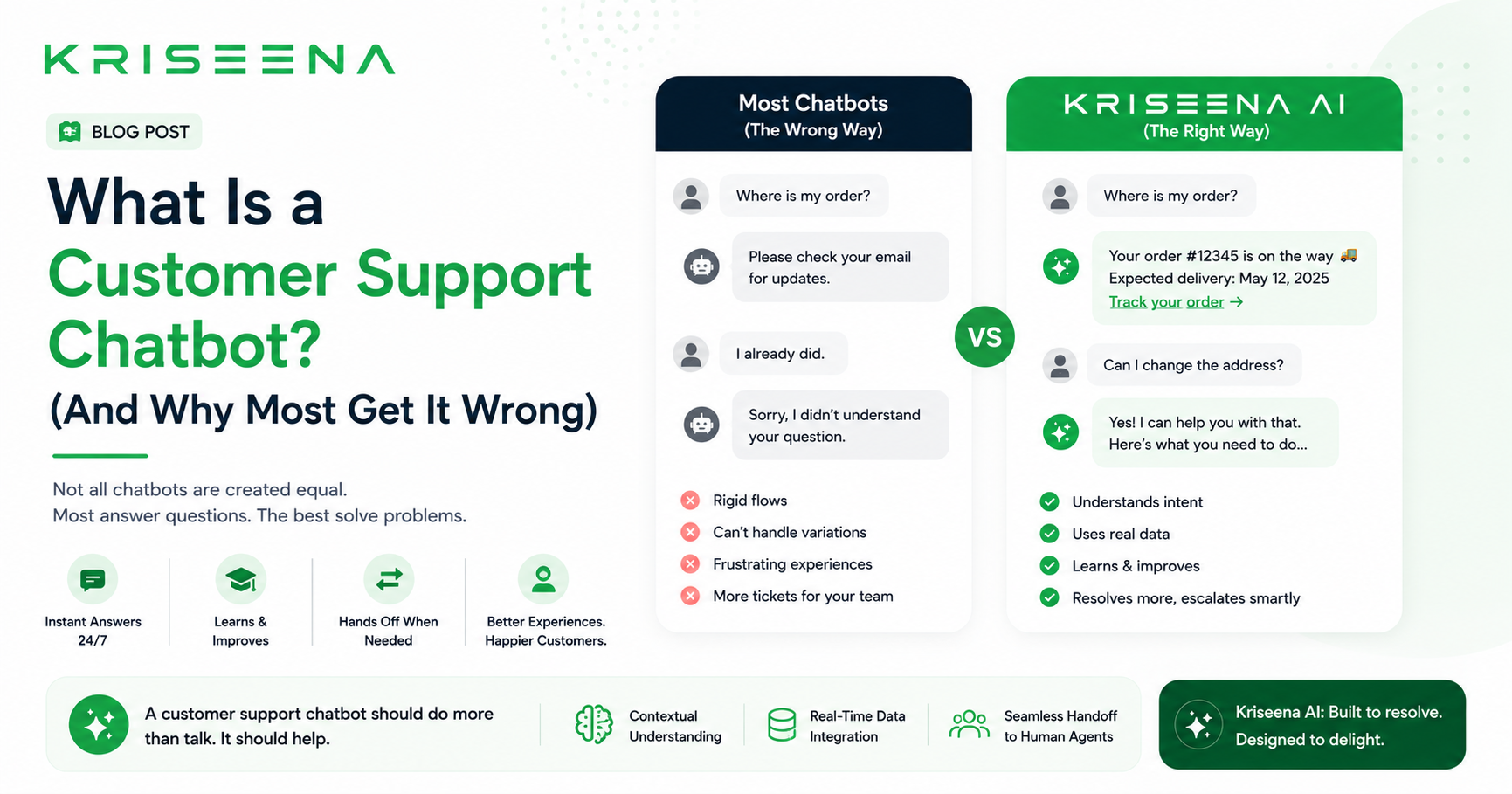
What Is a Customer Support Chatbot?
A customer support chatbot is a software tool that interacts with customers through a chat interface and attempts to answer their questions or resolve their issues without human agent involvement. Chatbots range from simple rule-based systems that follow pre-written decision trees, to modern AI-powered systems that use large language models to understand natural language and generate contextual replies.
The term "chatbot" covers a wide spectrum of capability. A basic chatbot that asks "What can I help you with today?" and presents four buttons is technically a chatbot. An AI system that reads your Shopify order data and tells a customer their exact tracking number in 10 seconds is also technically a chatbot. The difference in customer experience — and resolution rate — between the two is enormous.
Why Most Customer Support Chatbots Underperform
The gap between chatbot promise and chatbot reality is one of the most consistent frustrations in customer support technology. Vendors claim 70–80% automation rates. Businesses deploy and find the chatbot handling 10–15% of queries before hitting a wall and escalating to a human.
The reasons are predictable:
1. Rule-based chatbots cannot handle natural language variation
A rule-based chatbot is built around expected questions. It works when a customer types "track my order" — because that phrase was scripted. It fails when a customer types "I haven't received anything yet and I ordered last week" — because that phrasing was not anticipated.
Customer language is unpredictable. No matter how many variations a team scripts, real customers find new ways to ask the same questions. A chatbot that handles "where is my order?" correctly may fail on "any update on my parcel?" even though both ask the same thing.
2. No access to live customer data
Most chatbots cannot look up a specific customer's order, account, or history in real time. They can only provide generic answers. A customer asking "where is my order?" receives "To track your order, please visit our tracking page" — which is useless if the customer has already tried that, or if the tracking page requires information they do not have.
The queries customers ask most often are inherently personal. "Where is my order?" is not a general question — it is a question about their specific order, on their specific account, with their specific carrier. A chatbot that cannot access that data cannot answer it meaningfully.
3. The fallback breaks trust
Rule-based chatbots fail visibly. When a customer asks something outside the script, the chatbot responds with "I didn't understand that" or "Let me connect you with an agent" — which is often a queue with a 4-hour wait. The customer who came to chat for a quick answer is now worse off than if they had emailed directly.
Every chatbot fallback is a broken promise. Customers who experience repeated fallbacks stop trusting the chatbot entirely and skip it on future contacts — meaning the chatbot deflects nothing on repeat visits.
The Two Types of Customer Support Chatbot
Understanding the distinction between the two main chatbot types helps set realistic expectations before choosing a platform.
Type 1: Rule-Based Chatbot
How it works: The chatbot presents menus, asks clarifying questions, and routes customers through pre-built decision trees. Every possible conversation path must be built in advance by a human.
What it handles well: Simple FAQ routing ("What are your opening hours?"), basic contact form collection, directing customers to self-serve resources.
What it handles poorly: Any question phrased differently than expected, queries requiring live data, multi-intent questions, anything requiring context from earlier in the conversation.
Typical resolution rate: 10–25% of inbound queries.
Setup: High — every flow must be built and maintained manually. Adding a new query type means building a new flow.
Type 2: AI-Powered Chatbot (LLM-Based)
How it works: The chatbot uses a large language model to understand the customer's intent from natural language, retrieve relevant information from a knowledge base and live data sources, and generate a contextual reply specific to that customer's situation.
What it handles well: Order status queries (with live store integration), policy questions, product questions, account queries, multi-intent queries, questions phrased in any natural way.
What it handles poorly: Emotionally complex situations requiring human empathy, queries requiring actions (processing refunds, editing orders) — though this is changing with agentic AI.
Typical resolution rate: 60–75% of inbound queries for e-commerce businesses.
Setup: Low — write knowledge base articles for your top query types, connect your store, configure the AI persona. No flows to build.
What Makes a Customer Support Chatbot Actually Good
Live data integration
An AI chatbot connected to your Shopify or WooCommerce store can look up a customer's order in real time and reply with their actual tracking number, carrier, and estimated delivery date. This single capability handles 35–45% of e-commerce support volume — the WISMO queries that dominate every e-commerce inbox.
Without live data integration, a chatbot can only answer generic questions. With it, the chatbot answers the customer's actual question about their actual order.
Confidence-based escalation
Good AI chatbots know when they do not know. A confidence threshold determines which queries are answered automatically and which are escalated to a human agent (or flagged as a draft for human review). A query about a straightforward returns policy: high confidence, auto-reply. A query about a complex multi-item dispute with payment complications: low confidence, escalate immediately.
This mechanism prevents the two failure modes: wrong auto-replies that damage trust, and excessive escalation that defeats the purpose of automation.
Draft mode for human review
For businesses deploying AI for the first time, draft mode is the lowest-risk path. The AI generates the reply, but a human agent reviews and approves it before the customer sees it. The agent is not writing from scratch — they are reviewing and approving a draft in 60–90 seconds instead of writing in 5–7 minutes.
Draft mode gives businesses the efficiency gain of AI without the risk of incorrect auto-replies reaching customers before trust in the AI is established.
Knowledge base as the source of truth
The AI chatbot is only as accurate as the information it has access to. A knowledge base with clear, specific articles about your shipping policy, returns process, product details, and common issues gives the AI accurate material to generate replies from. Vague or missing articles produce vague or incorrect replies.
The knowledge base investment compounds: the same articles that feed the AI also serve as a self-serve resource for customers who search before contacting support.
Customer Support Chatbot Use Cases by Business Type
E-commerce (Shopify / WooCommerce)
The highest-impact use cases for e-commerce chatbots:
| Query type | % of inbox | AI resolution |
|---|---|---|
| Order status (WISMO) | 35–45% | Automated with live order lookup |
| Returns and exchanges | 15–20% | Automated with policy KB |
| Product questions | 8–12% | Automated with product KB |
| Order modifications | 6–10% | Draft for agent review |
| Damaged / wrong items | 8–12% | Draft for agent review |
Implementing an AI chatbot with live Shopify or WooCommerce integration typically resolves 60–70% of e-commerce support volume without agent involvement.
SaaS
For SaaS businesses, the highest-impact chatbot use cases are:
| Query type | % of inbox | AI resolution |
|---|---|---|
| How-to and feature questions | 30–40% | Automated with product KB |
| Account and billing queries | 15–20% | Automated with policy KB |
| Bug reports | 10–15% | Draft with escalation flag |
| Cancellation and downgrade | 8–12% | Draft for senior agent |
| Integration questions | 10–15% | Automated with technical KB |
SaaS chatbots typically resolve 55–65% of support volume — slightly lower than e-commerce due to higher technical query complexity.
How to Choose a Customer Support Chatbot
Questions to ask before choosing:
1. Does it use an LLM or rule-based logic? Ask the vendor to demonstrate a query phrased in an unusual way. A rule-based chatbot fails; an LLM-based chatbot handles it. This single test reveals more than any feature list.
2. Can it look up live order data? For e-commerce, this is non-negotiable. If the chatbot cannot retrieve a real order record, it cannot handle WISMO queries — which is your highest-volume query type.
3. What happens when it is not confident? Good AI chatbots escalate uncertain queries rather than guessing. Ask specifically: does it have a confidence threshold, and what does it do with low-confidence queries?
4. Is there draft mode? Draft mode is the lowest-risk deployment path for new AI chatbots. If the vendor does not offer it, you are choosing between full auto-send (higher risk) and no automation (no benefit).
5. What is the pricing model? Avoid per-conversation pricing — it spikes during promotions. Look for flat monthly pricing that does not change with support volume.
Setting Up a Customer Support Chatbot: The Right Order
Step 1 — Audit your top 10 query types (1 hour) Export 90 days of tickets and identify the 10 most common questions. These are your automation targets.
Step 2 — Write knowledge base articles for each (2–4 hours) One article per query type. Open with the answer. Include specific details — exact timelines, exact processes, exact policies.
Step 3 — Connect your store (30 minutes) Shopify or WooCommerce REST API connection. Verify with a live order lookup before going live.
Step 4 — Configure in draft mode (10 minutes) Set confidence threshold at 75–80. Enable draft mode. Every AI reply goes to agent review for the first 2 weeks.
Step 5 — Review drafts and fill gaps (Week 1–2) Review every draft. Where the AI is wrong or unsure, add or improve knowledge base articles. This calibration period is the most valuable part of the deployment.
Step 6 — Graduate to auto-send selectively After 2 weeks, enable auto-send for query types where AI accuracy exceeds 92%. Keep draft mode for lower-confidence categories.
Total setup time to first auto-send: 3–5 hours over 2 weeks.
Key Takeaways
- "Customer support chatbot" covers everything from simple button-click menus to LLM-powered AI — the difference in resolution rate is 10–15% vs 60–75%
- Rule-based chatbots fail on natural language variation and queries requiring live data — the two things that define most real customer queries
- LLM-based AI handles natural language, connects to live store data, and confidence-scores its replies to prevent incorrect auto-sends
- Live order data integration is non-negotiable for e-commerce — without it, the chatbot cannot handle WISMO, which is 35–45% of inbox volume
- Start in draft mode: AI drafts, humans approve. Run for 2 weeks before enabling any auto-send
- Good chatbots reach 60–75% resolution rate within 90 days; rule-based chatbots plateau at 10–25%
Frequently Asked Questions
What is a customer support chatbot? A customer support chatbot is a software tool that engages with customers through a chat interface and attempts to answer questions or resolve issues without human involvement. They range from simple rule-based systems with pre-built decision trees, to AI-powered systems using large language models that understand natural language and generate contextual, data-backed replies.
Do customer support chatbots actually work? AI-powered chatbots (LLM-based) work well for routine, factual queries — especially when connected to live data sources like Shopify or WooCommerce. They typically resolve 60–75% of e-commerce support volume. Rule-based chatbots work much more narrowly, resolving 10–25% of queries before hitting a script boundary and escalating. The difference is live data access and language understanding.
How much does a customer support chatbot cost? Pricing varies widely. Rule-based chatbot builders start from free (Tidio, ManyChat) to $50–200/month. AI-powered customer support platforms with LLM-based chatbots typically cost $49–$299/month depending on agent count and AI message volume. Avoid per-conversation pricing that spikes during promotions — flat monthly pricing is more predictable for growing businesses.
What is the best chatbot for e-commerce customer support? The best e-commerce customer support chatbot connects natively to Shopify or WooCommerce for live order lookup, uses an LLM (not rules) to understand natural language, includes a confidence threshold for safe auto-sending, and offers draft mode for initial deployment. These features together determine whether the chatbot resolves 65% of queries or 15%.
How do I set up a customer support chatbot? The process takes 3–5 hours: audit your top 10 query types, write one knowledge base article per type, connect your Shopify or WooCommerce store, configure the AI in draft mode (human reviews all replies), run for 2 weeks to identify gaps, then enable auto-send for query types where accuracy exceeds 92%. Most businesses reach 60%+ resolution rate within 90 days of structured setup.

Aswathi
Content Writer, Kriseena
Aswathi specialises in SaaS product content and customer experience topics. Her writing helps e-commerce founders and support managers understand how AI fits into their existing workflows.