
Every SaaS support team reaches the same point eventually.
A customer reports an issue that support can't solve. It isn't a password reset, a billing question, or a configuration mistake. It's a genuine product bug that needs engineering attention.
What happens next often determines both the customer experience and how quickly the issue gets resolved.
Too many teams rely on Slack messages, copied emails, or manually written Jira tickets. Important details get lost, developers ask for more information, support has to go back to the customer, and everyone wastes time.
A structured Jira escalation process eliminates this friction. With the right workflow, support teams can send complete bug reports to engineering while keeping customers informed throughout the process.
This guide explains when to escalate issues, what information every Jira ticket should contain, how to set up Jira for support escalations, and how AI can make the entire process faster.
Why a Structured Escalation Process Matters
Support and engineering have different responsibilities.
Support focuses on helping customers achieve their goals as quickly as possible.
Engineering focuses on identifying, reproducing, prioritizing, and fixing software defects.
Without a clear escalation process, these teams end up working against each other instead of together.
Common problems include:
- Incomplete bug reports
- Missing reproduction steps
- Duplicate Jira tickets
- Developers asking support for additional information
- Customers waiting days for updates
- Support agents manually rewriting conversations
A standardized workflow ensures engineering receives everything needed to investigate the issue while support remains the customer's primary point of contact.
When Should Support Escalate to Jira?
Not every support conversation belongs in Jira.
Many issues can and should be resolved by the support team without involving engineering.
Resolve Within Support When:
- The customer needs product guidance.
- The issue is caused by incorrect configuration.
- A billing or subscription question can be answered.
- Documentation explains the solution.
- A known workaround resolves the issue.
- The request is for training or onboarding.
Escalating these cases creates unnecessary work for developers.
Escalate to Jira When:
- The issue is reproducible.
- The product behaves differently from documented functionality.
- Multiple customers report the same problem.
- The application crashes or returns unexpected errors.
- Data is incorrect or missing.
- Performance has degraded unexpectedly.
- Security or reliability is affected.
- A feature is clearly malfunctioning.
Before escalating, verify that the issue isn't already tracked in Jira to avoid creating duplicate tickets.
Information Every Jira Ticket Should Include
Developers cannot fix what they cannot reproduce.
A high-quality Jira ticket should contain enough context for engineering to begin investigating immediately without returning to support for clarification.
Include the following information.
Clear Summary
A concise title describing the problem.
Example:
"Dashboard export fails for CSV files larger than 10 MB"
Avoid vague summaries such as:
"Customer has issue"
Customer Impact
Explain how the bug affects the customer.
For example:
- Unable to complete onboarding
- Checkout blocked
- Reports cannot be exported
- Data synchronization delayed
Understanding business impact helps engineering prioritize work.
Steps to Reproduce
List the exact sequence that causes the problem.
Example:
- Sign in.
- Open Reports.
- Select Export.
- Choose CSV.
- Click Download.
The more precise these steps are, the faster engineering can verify the issue.
Expected Behavior
Describe what should happen.
For example:
"The report should download successfully."
Actual Behavior
Explain what actually happens instead.
For example:
"The application returns a 500 error after approximately five seconds."
Environment Details
Include relevant technical information such as:
- Browser and version
- Operating system
- Device type
- Application version
- User role
- Region
- Account ID (when appropriate)
These details often reveal environment-specific issues.
Supporting Evidence
Whenever possible, attach:
- Screenshots
- Screen recordings
- Error messages
- Logs
- API responses
- Network traces
Visual evidence significantly reduces investigation time.
Setting Up Jira for Support Escalations
Jira works best when support and engineering share a consistent process.
Here are several practices that improve collaboration.
Create a Dedicated Bug Issue Type
Separate customer-reported bugs from internal engineering tasks.
This makes reporting and prioritization easier.
Use Priority Levels
Define clear severity guidelines.
For example:
Critical
- System unavailable
- Security issues
- Data loss
High
- Core workflows blocked
- Major customer impact
Medium
- Feature partially affected
- Workaround available
Low
- Cosmetic issues
- Minor usability improvements
Consistent priorities help engineering allocate resources appropriately.
Standardize Required Fields
Configure Jira to require information such as:
- Customer account
- Product area
- Environment
- Severity
- Reproduction steps
- Support conversation link
This prevents incomplete tickets from entering the backlog.
Link Support Conversations
Always include a link back to the original customer conversation.
Developers may need additional context that wasn't summarized in the ticket.
This also allows support agents to monitor engineering progress without searching across multiple systems.
How to Keep Customers Updated
Escalating a bug shouldn't mean the customer is left waiting without communication.
Support remains responsible for managing expectations while engineering investigates.
Acknowledge the Issue
Let the customer know:
- The issue has been confirmed.
- Engineering has been notified.
- The problem is being investigated.
Customers appreciate transparency even when an immediate fix isn't available.
Set Realistic Expectations
Avoid promising specific release dates unless engineering has confirmed them.
Instead, communicate the current status honestly.
For example:
"We've reproduced the issue and shared it with our engineering team. We'll update you as soon as we have more information."
Share Progress Updates
If the investigation takes several days, send periodic updates even if there is no resolution yet.
Silence often creates more frustration than delays themselves.
Notify Customers When Fixed
Once engineering resolves the issue:
- Confirm the fix.
- Explain what changed.
- Ask the customer to verify that the problem has been resolved.
- Thank them for reporting the issue.
Closing the feedback loop demonstrates accountability.
Common Escalation Mistakes
Even experienced support teams sometimes create unnecessary delays.
Avoid these common mistakes:
Escalating Without Verification
Confirm that the issue can be reproduced before creating a Jira ticket whenever possible.
Writing Tickets Without Context
A one-line description forces engineering to spend time gathering missing information.
Complete tickets reduce back-and-forth communication.
Creating Duplicate Bugs
Search existing Jira issues before opening a new ticket.
Duplicate tickets clutter the backlog and divide discussion across multiple issues.
Treating Jira as Customer Communication
Jira is an engineering tool, not a customer-facing communication channel.
Support should continue providing updates directly to the customer.
How AI Improves Jira Escalations
AI can significantly reduce the manual work involved in bug escalation.
Instead of copying long conversations into Jira, AI can automatically extract the information engineering needs.
This includes:
- Bug summaries
- Reproduction steps
- Customer impact
- Error messages
- Relevant product details
- Suggested priority
AI also helps identify duplicate issues by recognizing similar conversations before new tickets are created.
For support teams handling dozens of escalations every week, these capabilities save considerable time while improving ticket quality.
Jira Escalations with Kriseena
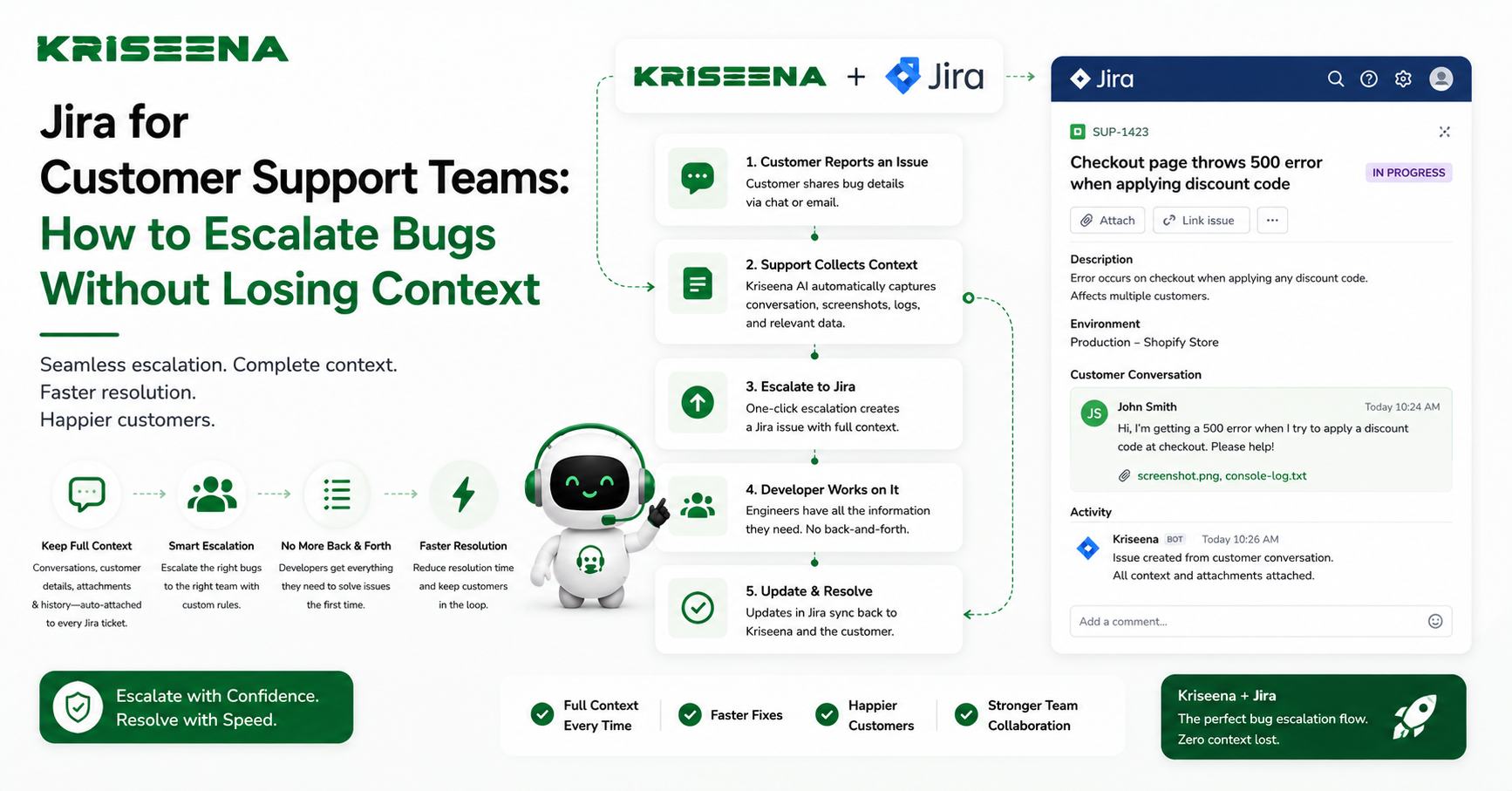
Kriseena streamlines the handoff between customer support and engineering through its one-click Jira escalation feature.
When a support agent identifies a genuine product bug, they can create a Jira issue directly from the conversation without leaving the helpdesk.
To reduce manual work, Kriseena uses AI to generate structured ticket summaries that include key context such as the customer's issue, reproduction details discussed during the conversation, business impact, and other relevant information. This helps engineering receive consistent, actionable bug reports while reducing the time support agents spend rewriting conversations.
By preserving the conversation context and linking support with engineering, teams can resolve bugs faster and keep customers informed throughout the process.
Final Thoughts
An effective Jira escalation process is about more than creating tickets. It's about ensuring the right information reaches the right people at the right time.
Support teams should resolve customer issues whenever possible, but when engineering involvement is required, a structured workflow prevents delays and reduces unnecessary back-and-forth.
By defining clear escalation criteria, standardizing Jira tickets, maintaining proactive customer communication, and using AI to capture context automatically, SaaS companies can improve collaboration between support and engineering while delivering a better customer experience.
Whether you're supporting hundreds or thousands of customers, combining Jira with an AI-powered helpdesk like Kriseena helps ensure product bugs move from customer report to engineering resolution with less manual effort and without losing valuable context.

Amrutha Suresh
Content Writer, Kriseena
Amrutha writes about AI customer support, e-commerce operations, and help desk best practices. She covers practical guides for support teams looking to scale without growing headcount.