
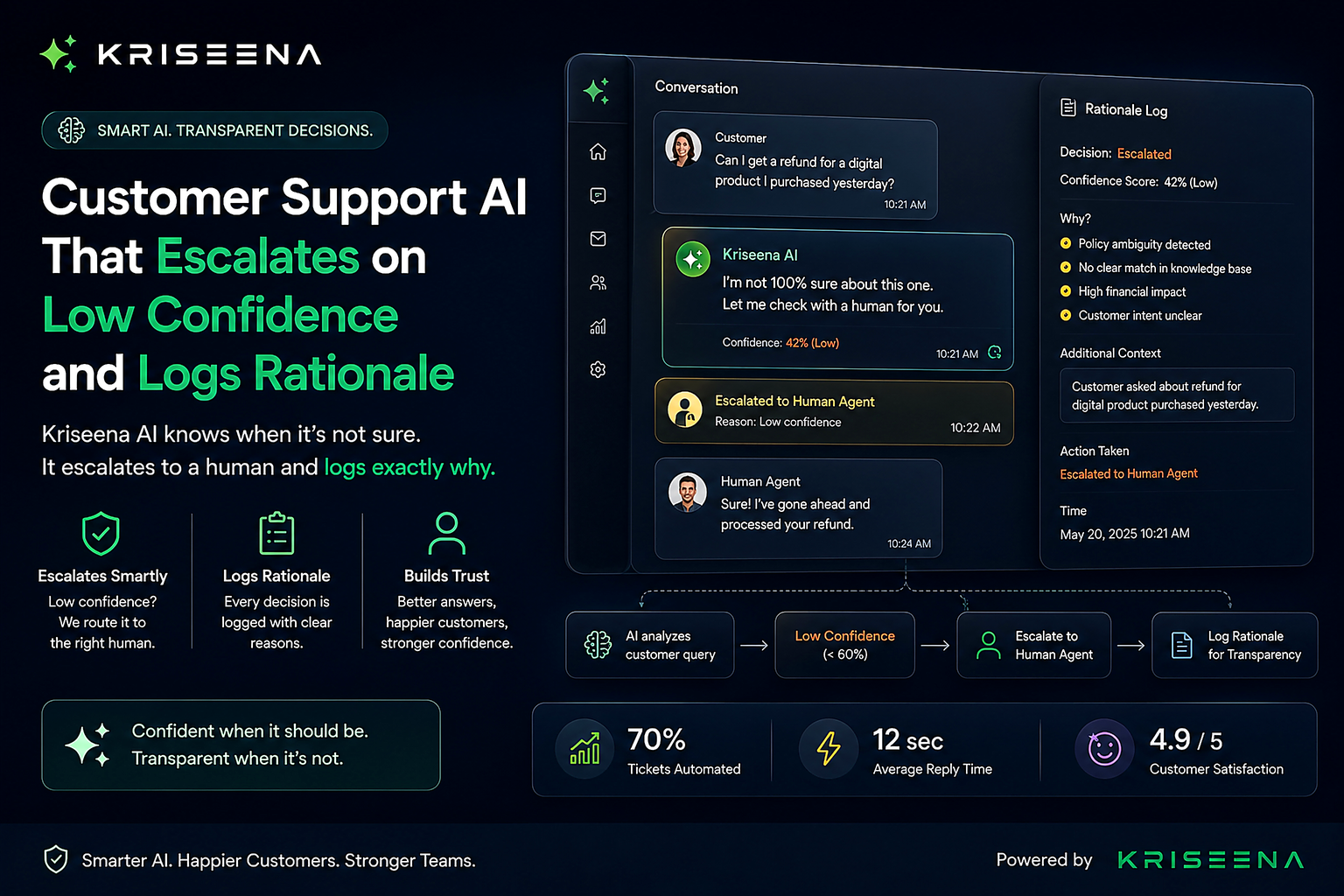
A customer support AI that escalates on low confidence and logs rationale is easier to trust than one that simply hands a ticket to a human with no explanation. Escalation alone is not enough. You also need to know why it happened, what information the AI considered, and what it would have done if it had responded.
Many AI support platforms stop at, "Escalated to an agent." That leaves support managers asking difficult questions later.
- Why did the AI refuse to answer?
- Was the confidence threshold too strict?
- Was the knowledge base incomplete?
- Did customer frustration trigger the escalation?
- Could this have been automated safely?
Without a detailed rationale log, those questions are impossible to answer.
Silent escalations create invisible problems
Imagine two identical support queues.
Both receive 500 AI conversations every day.
Both escalate 120 conversations to human agents.
Only one platform records why each escalation happened.
After one month, the difference becomes obvious.
The first team only knows that 3,600 tickets were escalated.
The second team knows:
- 1,400 escalated because confidence fell below 80%
- 900 escalated because the knowledge source conflicted
- 700 escalated because customers became frustrated
- 600 escalated because no verified documentation matched
Those numbers tell you exactly where to improve.
Why an escalation log matters
An escalation log transforms AI from a black box into a system you can inspect.
Instead of wondering why the AI acted a certain way, you can review every decision after the conversation ends.
A good log should answer these questions immediately:
- Why did the AI stop?
- What information did it use?
- Which rule triggered escalation?
- What would it have answered?
- Was the customer already frustrated?
That level of traceability helps both technical teams and business leaders.
What a rationale log entry should contain
Every escalation should include enough context for another person to reconstruct the AI's decision.
A complete rationale log includes the following information.
| Field | Why it matters |
|---|---|
| Timestamp | Shows exactly when the decision occurred |
| Conversation ID | Links the event to the support ticket |
| Confidence score | Explains how certain the AI was |
| Confidence threshold | Shows the configured escalation rule |
| Matched knowledge source | Identifies which document or policy the AI relied on |
| Customer sentiment | Indicates whether frustration affected the decision |
| Escalation trigger | Records the specific rule that activated |
| Draft response | Shows what the AI would have sent |
| Human assignment | Records who received the conversation |
| Final outcome | Helps compare AI decisions with human responses |
Together, these fields create a complete AI support audit trail instead of a simple event log.
Worked example: an AI escalation log
Below is an example of what a useful rationale record looks like.
| Field | Example |
|---|---|
| Timestamp | 2026-07-18 14:21 UTC |
| Ticket | #84291 |
| Confidence score | 63% |
| Threshold | 75% |
| Knowledge source | Returns Policy v3.2 |
| Customer sentiment | High frustration |
| Escalation reason | Confidence below threshold |
| AI draft response | "Based on the return policy, your item may qualify, but I cannot confirm because purchase verification is missing." |
| Human assigned | Sarah M |
| Final outcome | Refund approved after manual verification |
One record tells the complete story.
Without it, all you would see is:
Escalated to human.
That single line provides almost no operational value.
Confidence scores only matter if you can inspect them
Confidence scoring becomes useful when every decision is visible.
If your platform simply shows a percentage but never records it historically, you lose valuable operational data.
For a deeper explanation, read how confidence scoring works.
Historical confidence data lets you answer questions like:
- Which intents consistently receive low confidence?
- Which knowledge articles create uncertainty?
- Are confidence scores improving after documentation updates?
- Are product launches increasing escalations?
Those answers are impossible without persistent logging.
How to tune your threshold over time
One confidence threshold rarely fits every business forever.
A threshold of 70% might automate too aggressively.
A threshold of 95% might send almost everything to human agents.
Your escalation logs reveal where the balance should move.
For example:
| Current threshold | Automation rate | Human corrections |
|---|---|---|
| 70% | 91% | 18% |
| 80% | 83% | 8% |
| 85% | 76% | 4% |
| 90% | 60% | 2% |
Looking only at automation rate would suggest keeping 70%.
Looking at correction rates tells a different story.
If humans frequently rewrite AI responses at lower thresholds, raising the threshold may reduce costly mistakes.
More guidance is available in setting your confidence threshold.
Customer sentiment should be part of every decision
Confidence is only one signal.
A customer saying:
"Where is my package?"
is very different from someone saying:
"I've asked five times and nobody is helping me."
Even if confidence remains high, frustration may justify immediate human involvement.
A rationale log should record the customer's sentiment at the exact moment escalation occurred.
Later, you can identify patterns such as:
- Escalations caused primarily by frustration
- Escalations caused by missing documentation
- Escalations caused by conflicting policies
Those categories require different operational fixes.
Why regulated industries need audit trails
Healthcare, financial services, insurance, telecommunications, and government organizations often need to explain operational decisions months or years later.
Auditors rarely accept:
"The AI decided."
Instead, they ask questions like:
- What information was used?
- Which policy applied?
- Why was a human involved?
- Could the customer have received an incorrect answer?
- Was the escalation policy followed consistently?
An AI decision rationale customer support record helps answer those questions using evidence instead of assumptions.
Even businesses outside regulated industries benefit from this transparency when investigating complaints or improving quality assurance.
Reviewing escalations after the fact
One overlooked benefit of logging is post-incident analysis.
Suppose a customer complains that support took six hours to respond.
The escalation log might reveal:
- Confidence dropped to 61%
- Product documentation was outdated
- Customer sentiment became highly negative
- Escalation occurred correctly
- Queue delays happened after escalation
The problem was not AI quality.
The bottleneck was staffing.
Without detailed AI escalation logging, that distinction would never become clear.
The relationship between escalation logs and human handoffs
Escalation should not end with transferring a ticket.
The receiving agent needs context immediately.
A useful AI to human handoff includes:
- Confidence score
- Escalation reason
- Relevant knowledge source
- Customer sentiment
- AI draft response
The human agent spends less time reconstructing the conversation and more time solving the customer's problem.
Five questions to ask an AI vendor
Many vendors advertise "human escalation."
Far fewer explain how those decisions are recorded.
Ask these questions during evaluation.
1. Is every escalation logged with a confidence score?
If confidence is unavailable after the conversation ends, historical analysis becomes difficult.
2. Can I see exactly why the AI escalated?
Look for rule-based explanations instead of generic status messages.
3. Does the log include the knowledge source used?
Knowing which article or policy influenced the decision helps identify documentation gaps.
4. Can I review what the AI would have replied?
A draft response lets reviewers determine whether escalation was necessary or whether the AI was actually correct.
5. Can I export escalation logs for audits?
Your support platform should make audit data accessible instead of trapping it inside dashboards.
What good AI systems do differently
Reliable AI systems avoid pretending they know the answer.
Instead, they recognize uncertainty, explain it, and involve humans when appropriate.
That combination builds trust because every decision remains inspectable.
Rather than hiding behind automation, KRISEENA records confidence scores, draft responses, customer sentiment, matched knowledge, and escalation triggers so support teams understand every handoff instead of guessing later.
You can also explore KRISEENA's confidence scoring to see how confidence-based decisions fit into the broader support workflow.
Final thoughts
Automation is valuable, but traceability is what makes automation trustworthy.
The best customer support platforms do more than escalate. They document every important decision so managers, auditors, and support teams can understand exactly what happened.
If your AI cannot explain why it escalated a conversation, it becomes difficult to improve, difficult to audit, and difficult to trust.
KRISEENA combines confidence-based escalation with detailed rationale logging, ensuring every AI decision remains transparent instead of becoming another black box.

Aswathi
Content Writer, Kriseena
Aswathi specialises in SaaS product content and customer experience topics. Her writing helps e-commerce founders and support managers understand how AI fits into their existing workflows.