
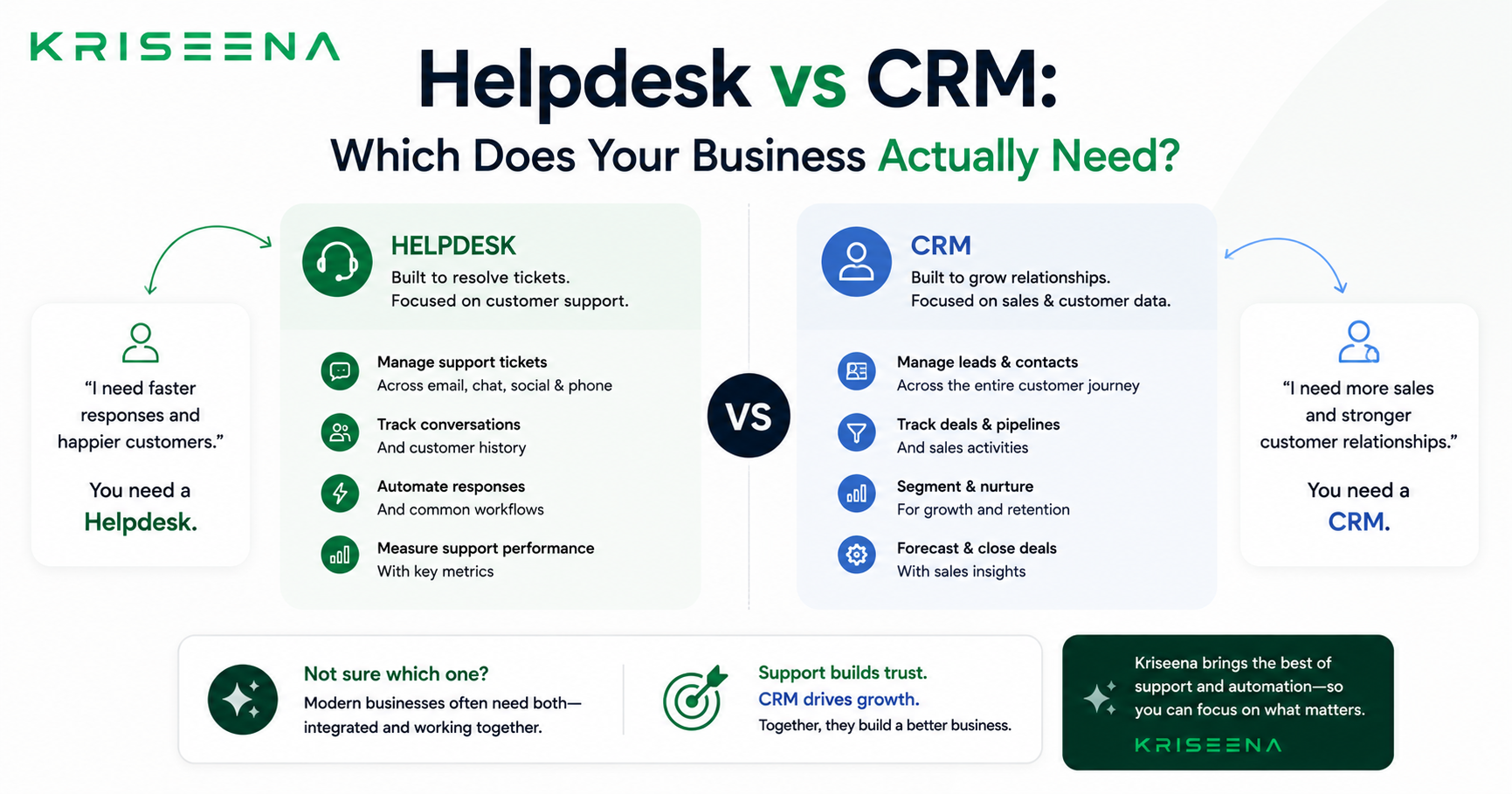
Helpdesk vs CRM: Which Does Your Business Actually Need?
If you have been researching customer support tools, you have almost certainly encountered both terms: helpdesk and CRM. They sound related. Many salespeople use them interchangeably. Some tools claim to be both. And yet they solve fundamentally different problems — and confusing the two leads businesses to buy the wrong tool, under-use the right one, or pay for features they will never touch.
This guide explains exactly what a helpdesk is, what a CRM is, where they overlap, and how to decide which one your business actually needs right now.
What Is a Helpdesk?
A helpdesk is a tool for managing inbound customer support requests. Its primary job is to help your team receive, organise, respond to, and resolve customer queries as efficiently as possible.
A helpdesk typically includes:
- Shared inbox — a central place where all customer messages (email, chat, social) land and can be managed by multiple team members
- Ticket or conversation management — status tracking (open, in progress, resolved), assignment to agents, and priority flagging
- Knowledge base — a library of articles the support team or AI can use to answer common questions
- Automation — rules that route, tag, or respond to messages automatically
- Reporting — metrics like first response time, resolution time, and CSAT
Examples: Zendesk, Freshdesk, Help Scout, Kriseena, Intercom (support module).
The helpdesk answers the question: how do we handle the support queries we are already receiving?
What Is a CRM?
A CRM — Customer Relationship Management system — is a tool for managing your relationships with existing and prospective customers over time. Its primary job is to track interactions, store customer data, and help sales and account management teams build and maintain relationships.
A CRM typically includes:
- Contact database — records for every customer and prospect, with contact details, company, and history
- Pipeline management — tracking where leads and deals are in the sales process
- Interaction history — logs of calls, emails, meetings, and notes associated with each contact
- Task and follow-up reminders — prompts for sales or account teams to take next actions
- Reporting — revenue forecasting, deal velocity, win rates
Examples: HubSpot, Salesforce, Pipedrive, Zoho CRM.
The CRM answers the question: who are our customers and prospects, and what is the state of our relationship with each of them?
The Core Difference
The simplest way to understand the difference:
- A helpdesk is reactive — it handles queries that come to you
- A CRM is proactive — it helps you manage relationships over time
A helpdesk is inbox-centric. A CRM is contact-centric.
In a helpdesk, the unit of work is a conversation or ticket. In a CRM, the unit of work is a contact or deal.
Where They Overlap
The confusion between helpdesk and CRM is understandable because there is genuine overlap:
Both store customer data. A helpdesk knows who has contacted you and what they asked. A CRM knows who your customers are and their full history with the business. Some helpdesks surface CRM data in the sidebar of a conversation. Some CRMs include a basic support ticket view.
Both track interactions. A helpdesk logs every support conversation. A CRM logs every sales or account interaction. For a small business, the distinction between a support interaction and a sales interaction can blur — especially when the founder handles both.
Some tools try to do both. Intercom, HubSpot, and Zoho all offer combined helpdesk and CRM functionality to varying degrees. These can work well, but they often do neither as well as a dedicated tool, and they tend to be priced for the combined value.
Which One Does Your Business Actually Need?
You need a helpdesk if:
- Customers are contacting you and you are struggling to respond quickly or consistently
- Support queries are being missed, handled by multiple people with no coordination, or tracked in a spreadsheet
- You want AI to answer common questions automatically
- Your primary problem is reactive — handling inbound queries
For most e-commerce businesses and early-stage SaaS companies, a helpdesk is the right first tool. The volume of inbound support is the immediate pain. A CRM is less urgent when your sales process is simple (e-commerce) or handled by the founders directly (early SaaS).
You need a CRM if:
- You have a sales team or account management function that needs to track deals and relationships
- You are selling B2B and deals involve multiple touchpoints over weeks or months
- You need to forecast revenue or track pipeline
- Your primary problem is proactive — managing relationships and closing deals
B2B SaaS companies with a sales motion need a CRM early. E-commerce businesses rarely need one until they are doing significant B2B wholesale.
You might need both if:
- You have both inbound support volume and an active sales or account management team
- You are B2B SaaS with both a sales motion and a support function
- Your customer success team needs to proactively manage renewals and expansions while also handling support tickets
In this case, the integration between the two tools matters. You want agents to see CRM data in the helpdesk, and you want support interactions to be visible in the CRM.
What Small Businesses Get Wrong
The most common mistake is buying a CRM when you need a helpdesk — usually because CRMs are marketed more aggressively and sound more strategic.
If your primary problem is that customers are emailing you and responses are slow, inconsistent, or falling through the cracks — you have a helpdesk problem, not a CRM problem. A CRM will not solve it. A CRM does not manage inbound support queues, does not draft AI replies, and does not give your whole team visibility into open customer issues.
The second most common mistake is buying an all-in-one platform when a single dedicated tool would do. If you do not have a sales team, you do not need a CRM. If you have very light support volume, you do not need an enterprise helpdesk. Start with the tool that solves your most urgent problem and add the second when the need is real.
A Quick Decision Framework
| Situation | What you need |
|---|---|
| Customers emailing, slow responses | Helpdesk |
| Support queries falling through cracks | Helpdesk |
| Want AI to answer common questions | Helpdesk |
| Managing a B2B sales pipeline | CRM |
| Tracking deals across multiple contacts | CRM |
| Account management and renewals | CRM |
| Both inbound support AND active sales | Both |
Summary
A helpdesk handles the support queries coming to you. A CRM manages the relationships you are actively building. Most small and mid-size businesses need a helpdesk before they need a CRM — because the most immediate pain is inbound query volume, not relationship tracking.
Start with the tool that solves your actual problem today. Add the second when your team and process need it.
Kriseena is a helpdesk built for e-commerce and SaaS teams. Shared inbox, AI auto-replies, Gmail integration, and Shopify/WooCommerce order lookup — all at a flat monthly price. Start your free 14-day trial at kriseena.com.

Aswathi
Content Writer, Kriseena
Aswathi specialises in SaaS product content and customer experience topics. Her writing helps e-commerce founders and support managers understand how AI fits into their existing workflows.